
When your school sends you an invitation to join their school account, this invitation will appear when you sign in to the invited account and navigate to your Classes page. A link is also sent to the email address associated with the invited Boom account.
When viewing the Classes page, the invitation appears like this:
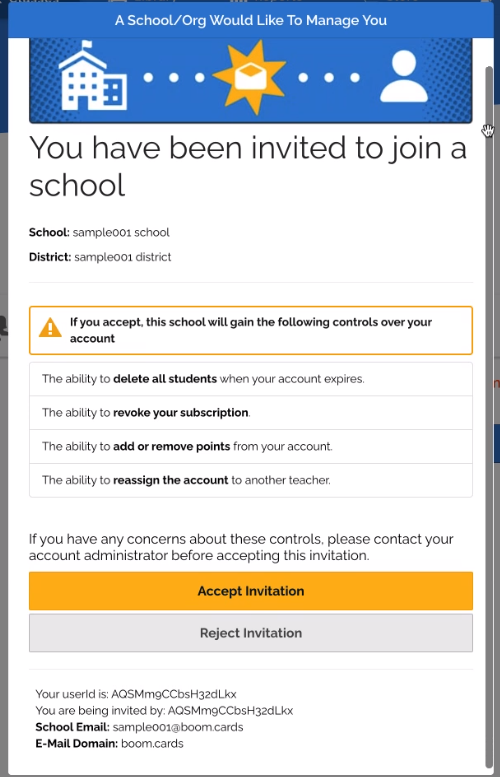
Accept Invitation
If you agree to the terms and accept the invitation, your School Dashboard Manager (SDM) will assign you a membership and add points, if applicable.
Reject Invitation
If you do not agree to the terms and reject the invitation, you have several options to consider. And your school can always re-invite you to join.
- You can still join the school account. But you and your School Dashboard Manager must agree to return the account and its contents to you, the original account owner, when you leave the school. You would then get to take all the spent points (purchased Boom cards, images, fonts, etc.) that were provided by the school. Send a help request to help@boomlearning.com and a Boom Customer Service Agent can provision your teacher account so you would not need to agree to the invitation terms. We will not be able to untangle the account and separate the original existing contents from the contents added using the school-provided points.
- The school can reimburse you for the existing contents of the account. The account will belong to the school and can be reassigned to another teacher.
- If neither you nor the School Dashboard Manager agrees to the above solutions, you can make your existing account into a personal account by changing your email to a personal email address. The SDM can create a separate and new account using the newly freed-up school email address.
If you and your administrator choose Option 1, please have your administrator send us an email at help@boomlearning.com with the agreed-upon solution so that we can make the proper notation on your account.