
TABLE OF CONTENTS
What is Feedback?
Feedback is a private message directly from the user to the Public Author. It is not published anywhere on the author's store and it does not affect the rating of a product. Feedback is a great tool to use when:
- You have a question about a specific card in a deck
- You think you have found a problem with a deck you've purchased
- Want to make a suggestion, or even request new content from a specific seller/author
The easiest way to provide feedback to a Public Author is while you are previewing a deck. This can be done either from your Library or the deck's Store page. You will see a blue "Feedback" button in the lower-left corner during preview:

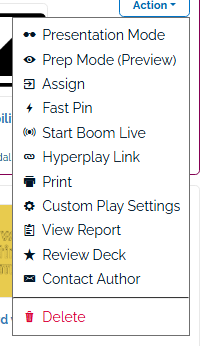
You can also access the Feedback tool directly from your Library. Find the deck you want to leave feedback on, click the "Action" dropdown menu. Select the "Contact Author" option.
If you want to leave feedback about a specific card in the deck, make sure your preview is displaying that card, and then click the Feedback button. The author will be able to see which card you submitted the comment on, so they can better understand the context of your feedback. You can then type out your comment in the text box below.
When you click "Submit," your message will be sent directly to the author of the deck. If the author responds to your message, you will be notified via email.
How to Give Effective Feedback
Here are some tips for giving effective feedback:
- Treat others as you would like to be treated. Constructive criticism should be given in a kind manner.
- Feedback is private and anonymous. This is an opportunity to help your author make their product better in a non-public way. This is a great way to request correction of a typo, ask for clarification on the teaching purpose of a card, and more.