
If your students are having trouble using their Boom QR codes, a code may have been replaced when a new one was generated. Here is how to check and prevent this from happening when you print.
What Happens When You Generate a New QR Code?
Generating a new QR code replaces the previous code. This means an older printed copy will no longer work.
Each QR code is labeled with the date and time it was generated. Check these details to help identify the most recent version.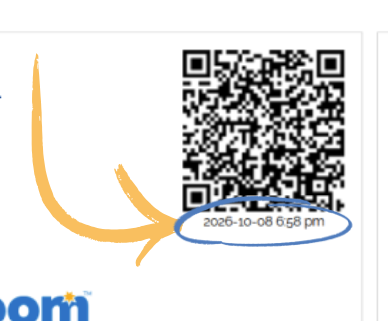
How to Print Without Replacing Existing Codes
If you need another copy of your students’ current QR codes, leave “reset QR codes” unchecked when printing. This keeps the existing codes valid.
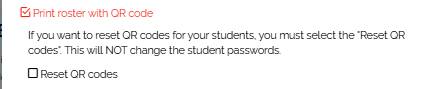
If you do reset the codes, provide students with the newly generated copies and replace any older copies they use.
Need Help?
If you get stuck, you’re not alone. You can reach out to:
- help@boomlearning.com
- (833) WOW-BOOM
A real person will help you get back on track.