
TABLE OF CONTENTS
- Renewing your Subscription Early
- Monthly Subscription Renewal
- Auto renewing Subscription
- Canceling your Auto Renewing Subscription
Renewing your Subscription Early
With our new Subscription renewal process, a slight change was implemented. Now when you renew early, you will be credited the cost of the remaining days. The Credit will be listed as "Subscription Credit".
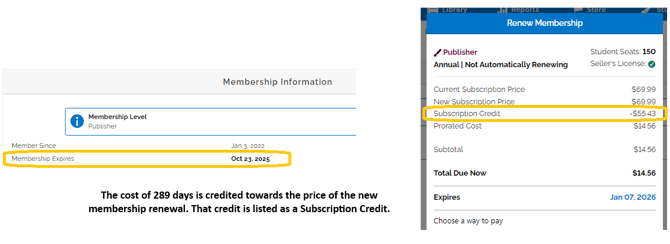
The example above shows a user who renewed their Publisher Subscription with 289 days remaining in their current Subscription, they were credited $55.43 towards their purchase of a $69.99 Publisher Subscription and their new expiration date is January 7th 2026.
The Subscription Credit is a pro-rated amount calculated using the days left on the existing Subscription at time of renewal and the price you paid for that Subscription.
If you are worried about not being able to renew early to maintain access to your paid Subscription features, you can now turn on Auto Renewing Subscriptions. This will allow you to never have to worry about interruptions to your students' access again.
Monthly Subscription Renewal
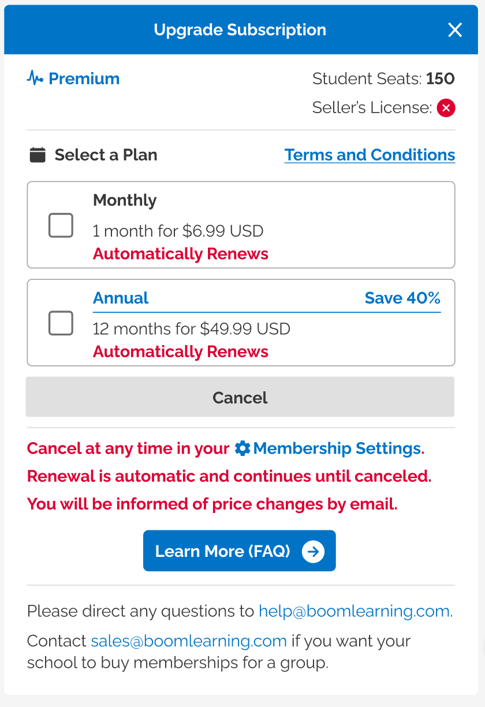
Monthly Subscription renewals is available for our Premium Subscription Tier. This will allow users to renew their Subscription each month instead of paying a lump sum for the year.
You can select a Monthly renewal or an Annual at the time of purchase.
Auto renewing Subscription
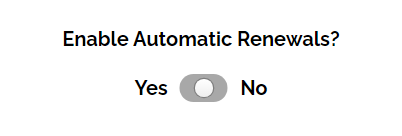
Auto-renewals are available for all Subscription level users to opt in and out at time of renewal with a toggle; click the toggle once to opt in and click it a second time to opt out.
If you have an auto renewing Subscription and there are changes to your payment, please verify your payment method on file is accurate before your renewal date so your Subscription is not interrupted. For information about updating your payment method, check out this article: Manage Your Credit Card
Canceling your Auto Renewing Subscription
You can cancel your auto renewing Subscription at any time, from the Subscription tab in your settings.

When you cancel an auto renewing Subscription, you will not be charged for your future renewals. To avoid being charged, make sure to cancel 48 hours before your renewal date.
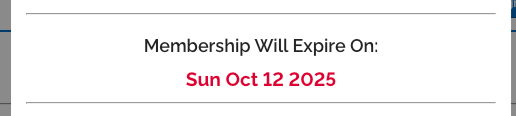
When you cancel, the date your Subscription expires will be displayed in red.
For information about what happens when a Subscription expires, please visit this article: What happens to my paid Subscription or free trial when it expires?
If you have any further questions, please feel free to email us at help@boomlearning.com or call us at (833) WOW-BOOM. A real human will happily help you!